
Back in the days when we were supposed to work with slow WAN links it was very important to use your bandwidth wisely. It was pretty common to have leased lines or frame relay services with 64, 128 or 256 Kbps and we were using these lines to carry all business related critical information, such as Email, accounting software, voice and so on. Thankfully the access to the Internet is more easier today and the speeds are not so restricted but there are a lot of organizations out there who are still utilizing such lines in their WAN infrastructure.
As you can imagine, when you have a leased line with 64kbps capacity it is technically impossible to use it for voice with G.711 codec. By definition G.711 needs exactly 64kbps throughput so there will be no available bandwidth for the other applications in case of an active call through this line. Because of that Cisco implemented a feature called Call Admission Control (CAC) where the system administrators can define what kind of codecs to use between the different branches and what amount of the available bandwidth to be reserved for voice. Nowadays there are automated QoS processes and CAC which can dynamically reserve bandwidth but here we are going to do it the old fashioned way – manually.
As we mentioned, in order to implement Call Admission Control in a centralized call-processing system, you need to configure 2 things – the codecs to be used between two sites and the amount of bandwidth available for that kind of traffic. The audio codec determines the algorithm of compression and the maximum amount of bandwidth per single call.
For purposes of location bandwidth calculations only, assume that each call stream consumes the following amount of bandwidth:
- G.711 call uses 80 kb/s.
- G.722 call uses 80 kb/s.
- G.723 call uses 24 kb/s.
- G.728 call uses 16 kb/s.
- G.729 call uses 24 kb/s.
- GSM call uses 29 kb/s.
- Wideband call uses 272 kb/s.
In the case of Cisco Unified Communications Manager centralized call-processing system, usually there is a central location (HQ) where the whole CUCM cluster is located, together with a lot of different devices – phones, gateways, etc. In the remote branches it is possible to have the same type of devices but without CUCM nodes. In order to define the maximum available bandwidth for audio and video calls we are defining Locations.
The Regions are the other parameter, which is used to define the maximum allowed codec between two endpoints. It is important to mention that you might have branches with the same region configured (for example restricting them to G.729) but in different locations so that one of the branches may establish more simultaneous calls than the other.
Task 1: Configure Regions
Configure Regions in Cisco Communications Manager.
Activity Procedure
Complete these steps:
- From the menu select System > Region Information > Region.
- Click Add New.
- On Region Configuration page, use SJC-Region for the region name.
- Click Save.
- On Region Configuration page, on Modify Relationships to other region, click SJC-Region and change the Maximum Audio Bit Rate to 64 kbps (G.722,G.711), and click Save.
- Click Add New.
- On Region Configuration page, use CHI-Region for the region name.
- Click Save.
- On Region Configuration page, on Modify Relationships to other region, click CHI-Region and change the Maximum Audio Bit Rate to 64 kbps (G.722,G.711), and click Save.
- On Region Configuration page, on Modify Relationships to other region, click SJC-Region and change the Maximum Audio Bit Rate to 8 kbps (G.729), and click Save.
- On Cisco Unified Communications Manager Administration page, from the menu select System > Device Pool.
- Click Find.
- Click on device pool SanJose.
- Change the region to SJC-Region.
- Click Save.
- Click Reset, Reset and Close.
- On Cisco Unified Communications Manager Administration page, from the menu select System > Device pool.
- Click Find.
- Click on device pool Chicago.
- Change the region to CHI-Region
- Click Save.
- Click Reset, Reset and Close the window.
Activity Verification
You have completed this task when you attain these results:
- Establish call between Phone1-1 and Phone1-2, verify that G711 codec is used.
- Establish call between Phone2-1 and Phone2-2, verify that G711 codec is used.
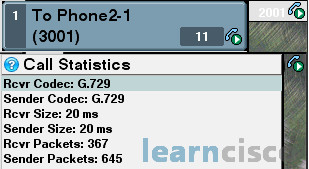
- Establish call between Phone1-1 and Phone2-1, verify that G729 codec is used.
You can see the codec being used by hitting the “I” button on the VTGO softphone or by double-click the “?” button on the CIPC.
Task 2: Configure Locations
Configure Cisco Unified Communications Manager to use locations based Call Admission Control between 2 sites
Activity Procedure
Complete these steps:
- From the Navigation menu select Cisco Unified Serviceability and click Go.
- From the menu select Tools > Service Activation.
- Activate the service Cisco Location Mandwidth Manager and click Save and OK.
- On Cisco Unified Communications Manager Administration page, from the menu select System > Location Info > Location.
- Click Add New.
- Use SJC-Location for Location name.
- Allow two (2) G729 voice calls from this location. Set the Audio Bandwidth to 48 Kbps.
- Click Save.
- Click Add New.
- Use CHI-Location for Location name.
- Allow one (1) G729 voice call from this location. Set the Audio Bandwidth to 24 Kbps.
- Click Save.
- For Phone1-1 and Phone1-2, assigned the correct location. On Cisco Unified Communications Manager administration page, from the menu select Device > Phone. Click Find to display all phones.
- Click on Phone1-1, change location to SJC-Location, click Save, and Reset.
- Repeat steps 10 – 11 for Phone1-2.
- For Phone2-1 and Phone2-2, assigned the correct location. On Cisco Unified Communications Manager administration page, from the menu select Device > Phone. Click Find to display all phones.
- Click on Phone2-1, change location to CHI-Location, click Save, and Reset.
- Repeat steps 13 – 14 for Phone2-2.
Activity Verification
You have completed this task when you attain these results:
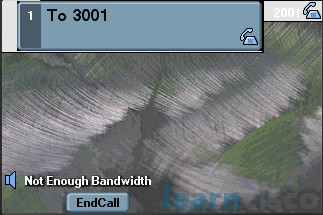
- Establish call between Phone1-1 and Phone2-1.While this call is still active, establish another call between Phone1-2 and Phone2-2, the call will not go through and “Not enough Bandwidth” will be displayed on the screen of the IP Phone.
Our Recommended Premium CCNA Training Resources
These are the best CCNA training resources online:
Click Here to get the Cisco CCNA Gold Bootcamp, the most comprehensive and highest rated CCNA course online with a 4.8 star rating from over 30,000 public reviews. I recommend this as your primary study source to learn all the topics on the exam.

Want to take your practice tests to the next level? AlphaPreps purpose-built Cisco test engine has the largest question bank, adaptive questions, and advanced reporting which tells you exactly when you are ready to pass the real exam. Click here for your free trial.
