
Cisco Unified Communications Manager supports several types of Cisco Unified Communications gateways. The Voice Gateways are used for call termination when the internal IP Telephony infrastructure has to communicate with the PSTN and other non-IP telecommunications devices, such as private branch exchanges (PBXs), key systems, analog phones, fax machines, and modems.
Trunk interfaces specify how the gateway communicates with the PSTN or other external devices by using time-division-multiplexing (TDM) signaling. Cisco Unified Communications Manager and Cisco gateways use a variety of TDM interfaces, however the supported TDM interfaces may vary based on the gateway generation. In general the Cisco Unified Communications Manager supports two major types of gateways based on the protocol being used to control them – Media Gateway Control Protocol (MGCP) and H.323 gateways. However, in the recent time there are more and more implementations of SIP trunks between the CUCM and the Voice gateway, sometimes referred as Cisco Unified Border Element (CUBE).
Task 1: Add a H.323 Gateway to Cisco Unified Communications Manager
In this task we will add both routers as an H.323 gateways to Cisco Unified Communications Manager.
Activity Procedure
Complete these steps:
- On Cisco Unified Communications Manager Administration page, from the menu select Device > Gateway and click Add New.
- For gateway type, select H.323 Gateway, and click Next.
- On the Gateway Configuration page, use the following parameters:
– Device Name: 10.1.1.101 (the IP address of the H323 Gateway connected to the Voice LAN)
– Device Pool: SanJose
– Uncheck
– Significant Digits: 4 (four)
– Leave other parameters to default. - Click Save.
- Click Reset button, and another Reset button.
- Now the IP address of the H323 gateway will appear.
- Repeat steps 1 – 5 for the second router with the following parameters:
– Device Name: 10.1.1.102 (the IP address of the H323 Gateway connected to the Voice LAN)
– Device Pool: Chicago
– Uncheck
– Significant Digits: 4 (four)
– Leave other parameters to default.
Activity Verification
You have completed this task when you attain these results:
- Both router are listed as a H.323 gateway in Cisco Unified Communications Manager.
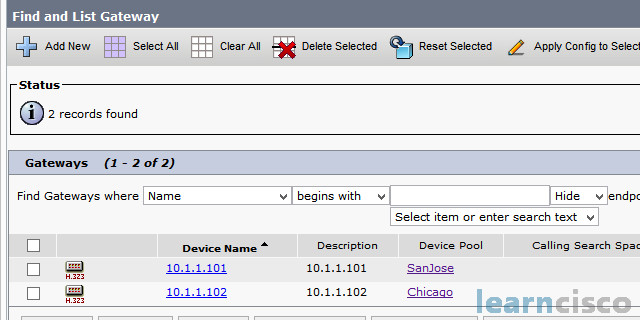
Task 2: Configure a voice gateway for Cisco Unified Communications Manager controlled H.323 SIP Trunk
In this task we will configure both routers as a H.323 voice gateways controlled by Cisco Unified Communications Manager.
Activity Procedure
Complete these steps:
- Open a telnet session to the router Site 1.
- Type in configure terminal to access the configuration mode.
- Type in voice service voip command to enter into Voice over IP configuration.
- Type in allow-connections h323 to sip in order to enable H.323 to SIP communication.
- Type in allow-connections sip to h323 in order to enable SIP to H.323 communication.
- Enter exit to leave Voice over IP configuration.
- Enter interface configuration mode with interface FastEthernet 0/0 command.
- Type in h323-gateway voip bind srcaddr 10.1.1.101 command.
- Enter exit to leave interface configuration mode.
- Type in dial-peer voice 14085552 voip command to create dial peer.
- Enter a destination pattern with destination-pattern 14085552… command.
- Enter session target with session target ipv4:10.1.1.10 command.
- Specify the codec to be used when establishing a session through this dial-peer with codec g711ulaw.
- Type Exit.
- Type in dial-peer voice 9 voip command to create another dial peer.
- Enter a destination pattern with destination-pattern 9.T command.
- Enter session target with session target ipv4:10.1.2.2 command.
- Configure the signalling protocol with session protocol sipv2.
- Specify the codec to be used when establishing a session through this dial-peer with codec g711ulaw.
- Enter exit to leave dial peer configuration mode.
- Type in exit to leave configuration mode.
- Save router configuration with write command.
- Repeat steps 111111 to configure the second router but change the parameters to match the specification:
– dial-peer voice 9 voip – session target ipv4:10.1.2.1
– dial-peer voice 13124443 voip – destination-pattern 13124443…
Activity Verification
You have completed this task when you attain these results:
– Execute the command show dial-peer voice summary and get the following output
R1#show dial-peer voice summarydial-peer hunt 0AD PRE PASS OUTTAG TYPE MIN OPER PREFIX DEST-PATTERN FER THRU SESS-TARGET STAT PORT14085- voip up up 14085552… 0 syst ipv4:10.1.1.105529 voip up up 9.T 0 syst ipv4:10.1.2.2
R2#show dial-peer voice summarydial-peer hunt 0AD PRE PASS OUTTAG TYPE MIN OPER PREFIX DEST-PATTERN FER THRU SESS-TARGET STAT PORT9 voip up up 9.T 0 syst ipv4:10.1.2.113124- voip up up 13124443… 0 syst ipv4:10.1.1.10443
Our Recommended Premium CCNA Training Resources
These are the best CCNA training resources online:
Click Here to get the Cisco CCNA Gold Bootcamp, the most comprehensive and highest rated CCNA course online with a 4.8 star rating from over 30,000 public reviews. I recommend this as your primary study source to learn all the topics on the exam.

Want to take your practice tests to the next level? AlphaPreps purpose-built Cisco test engine has the largest question bank, adaptive questions, and advanced reporting which tells you exactly when you are ready to pass the real exam. Click here for your free trial.
